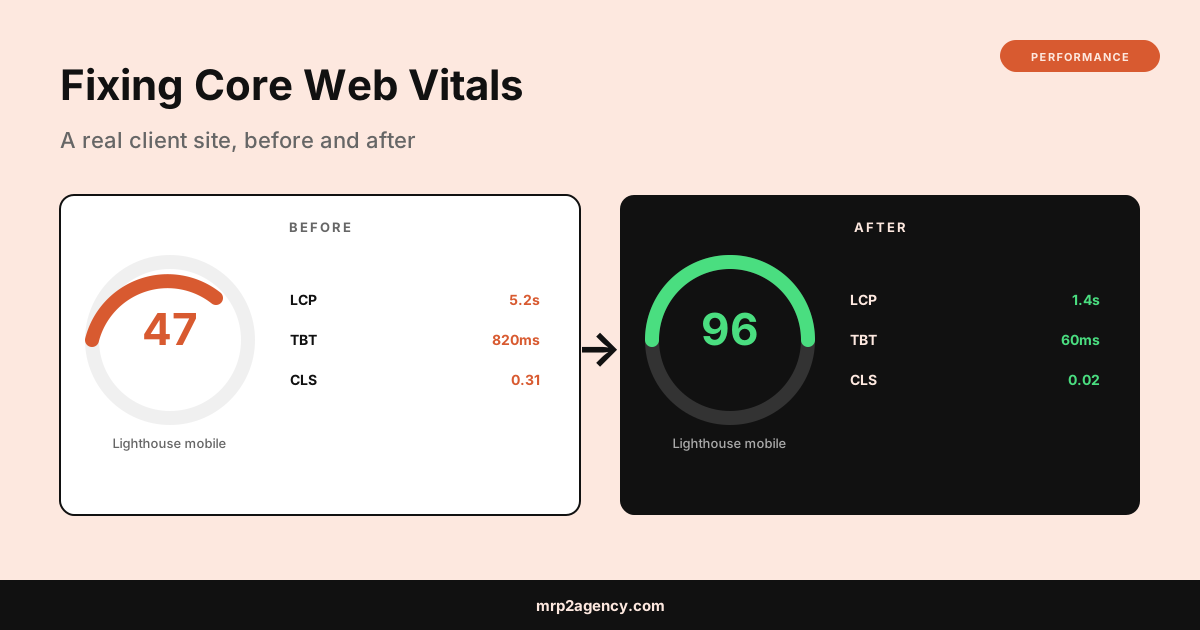
Same content, same backlinks, same everything. So what changed?
Google’s Core Web Vitals update finally caught up to them. The site was slow, janky, and built on a stack of WordPress page-builder plugins that loaded 3.2 MB of JavaScript before anything rendered. How to fix Core Web Vitals when you’ve inherited a site like this is the question I answer with this exact playbook every few months.
Here’s the actual audit, what I changed, what it took, and the numbers before and after. Real client, anonymized name. Everything else is real.
What Core Web Vitals Actually Measure
Three numbers, all of them about user experience on mobile:
- Largest Contentful Paint (LCP). How long until the biggest visible thing on screen finishes loading. Google wants this under 2.5 seconds.
- Total Blocking Time (TBT) or Interaction to Next Paint (INP). How long the page is frozen while JavaScript runs. Under 200ms is the target.
- Cumulative Layout Shift (CLS). How much the page jumps around as it loads. Under 0.1 is the target.
Google rolled these out as ranking signals in 2021 and tightened the weighting in 2024. If you’re failing all three on mobile, you’re not just slow. You’re getting actively demoted in search results.
Step 1: Diagnose with PageSpeed Insights
I always start at PageSpeed Insights. Paste the URL, look at the mobile tab (not desktop, mobile is what gets penalized), and read the actual diagnostics.
For the client site, the initial scores looked like this:
| Metric | Score | Target | Verdict |
|---|---|---|---|
| Lighthouse (mobile) | 47 | 90+ | Failing |
| Largest Contentful Paint | 5.2s | <2.5s | Poor |
| Total Blocking Time | 820ms | <200ms | Poor |
| Cumulative Layout Shift | 0.31 | <0.1 | Poor |
The diagnostics flagged three primary issues: render-blocking JavaScript, unoptimized images, and layout shifts from images without dimensions. Standard WordPress problems. The kind of thing every page-builder-heavy site shows.
Step 2: Fix Largest Contentful Paint
LCP was the biggest win. The hero image on the homepage was a 4.2 MB JPG (yes, MB) at 4000x2667 pixels, displayed at 1200x800. Forty-two times larger than necessary.
The fixes:
- Resized the hero image to 1600x1067 (still 2x for retina displays)
- Converted to WebP format with a JPG fallback
- Compressed with ImageOptim to ~140 KB
- Added
loading="eager"on the LCP image andloading="lazy"on everything else - Preloaded the hero image in
<head>with<link rel="preload" as="image"> - Self-hosted the Google Font instead of loading from googleapis.com (saves a DNS lookup and 200ms of font-display blocking)
Time: ~90 minutes. LCP dropped from 5.2s to 1.6s.
The general principle: the LCP element should be the smallest, fastest thing you can serve. Images bigger than what they display at are wasted bytes that Google penalizes you for.
Step 3: Fix Total Blocking Time
TBT was almost entirely caused by plugin JavaScript. The site had 23 active WordPress plugins, each loading their own JS on every page. Most of them were used on one page only.
The fixes:
- Audited every plugin. Deleted 8 that weren’t actively used.
- Used Asset CleanUp to dequeue plugin scripts on pages where they weren’t needed (so the contact form’s JS only loads on the contact page, not the homepage)
- Deferred third-party scripts (analytics, Facebook pixel, chat widget) with
asyncordeferattributes - Moved the chat widget to load after 3 seconds via a small inline script, not blocking the initial render
- Replaced jQuery-based slider with a CSS-only solution (saved 95 KB of jQuery + plugin code)
Time: ~3 hours. TBT dropped from 820ms to 110ms.
The lesson: every plugin is a tax on every page. Audit them. Most sites can delete half without losing anything users actually care about.
Step 4: Fix Cumulative Layout Shift
CLS was caused by images without explicit dimensions and ads that loaded into containers without reserved space. The page literally shifted as content arrived.
The fixes:
- Added
widthandheightattributes to every<img>tag (Modern browsers use these to reserve the correct aspect ratio before the image loads) - Reserved space for the dynamically-loaded review widget with a CSS placeholder of the correct height
- Set explicit dimensions on the embedded Google Map iframe
- Moved the cookie notice from the top of the page to the bottom (so it doesn’t push content down when it appears)
Time: ~45 minutes. CLS dropped from 0.31 to 0.02.
This is the easiest CWV problem to fix and the one most developers skip. It is genuinely 30 minutes of attribute-adding for most sites.
Before and After
The total time investment was about five hours of focused work. The results:
| Metric | Before | After | Target |
|---|---|---|---|
| Lighthouse mobile | 47 | 96 | 90+ |
| LCP | 5.2s | 1.4s | <2.5s |
| TBT | 820ms | 60ms | <200ms |
| CLS | 0.31 | 0.02 | <0.1 |
Within six weeks of deploying the changes, the site was back to page two for their main query. Within ten weeks it was back to page one and ranking ahead of where it had been before the drop. Same content. Just faster.
Fast Loading Website Best Practices
The pattern across every CWV audit I run is the same handful of issues. If you don’t want to do a full audit, just go check these five things on your site right now:
- Are your largest images appropriately sized? Open the homepage, right-click on the hero image, “open in new tab,” check the resolution. If it’s 3000+ pixels wide for a 1200-pixel slot, that’s your LCP problem.
- Are images served as WebP or AVIF? If they’re still JPGs or PNGs, you’re carrying 30-50% more weight than necessary.
- Do you have more than 15 active plugins? Probably half of them are doing nothing for users. Audit and cut.
- Do
<img>tags have width and height attributes? View source on the page. If they don’t, that’s your CLS problem. - Are third-party scripts (chat widgets, analytics, ads) loading immediately or deferred? If immediate, that’s your TBT problem.
For the deeper context on why Google weights this so heavily, web.dev’s Core Web Vitals overview is the canonical reference. Lighthouse and the Chrome DevTools Performance tab are the tools I use day to day.
Mobile First Web Design Checklist
While I had the site open, I also checked the basics most agencies skip:
- Tap targets at least 44 pixels apart
- Font sizes 16px minimum on body text
- Forms one column on mobile, never two
- Images set to
max-width: 100%; height: auto - Tables that scroll horizontally instead of overflowing
- Modal popups dismissible without zooming
Most of these are CSS one-liners that the original developer just never bothered with. Fixing them takes another two hours and improves the bounce rate before you ever touch CWV.
What This Means for Your Site
If you’re a small business owner reading this and your Lighthouse mobile score is below 70, you have an SEO problem and a conversion problem. They’re the same problem. Google’s punishing you, and your visitors are leaving before the page finishes loading.
The fix isn’t a rebuild. It’s usually about three to five hours of targeted work on the existing site. The case study above is typical, not exceptional.
If you’d rather not learn DevTools and start measuring TBT yourself, that’s a reasonable place to bring someone in. The vetting framework from hiring a freelance web developer in Kansas City applies directly: a developer who can’t explain their last three Core Web Vitals fixes in plain English shouldn’t be touching your site.
Want me to look at your current scores and tell you where the gains are? Tell me about your project and I’ll give you an honest assessment, even if the answer is “this is fine, you don’t need me.”