So this post does two things. It gives you realistic cost ranges for a custom web app, and it gives you a way to decide whether you should spend that money. I’m a solo developer in Kansas City, so these numbers reflect how I scope and price work, not an agency rate card.
What a Custom Web App Is (and Isn’t)
A website shows information. A web app does something with it: people log in, enter data, and the system responds with a workflow, a calculation, a report, or a payment. Think a client portal, a booking and invoicing system, a quoting tool, or an internal dashboard that replaces five spreadsheets.
If you only need pages, forms, and a blog, you want a website, and what a custom website costs is a different and lower number. The line is whether your users or staff need accounts and stored data. Once they do, you’re in app territory, and the price moves.
Custom Web Application Development Cost: Realistic Ranges
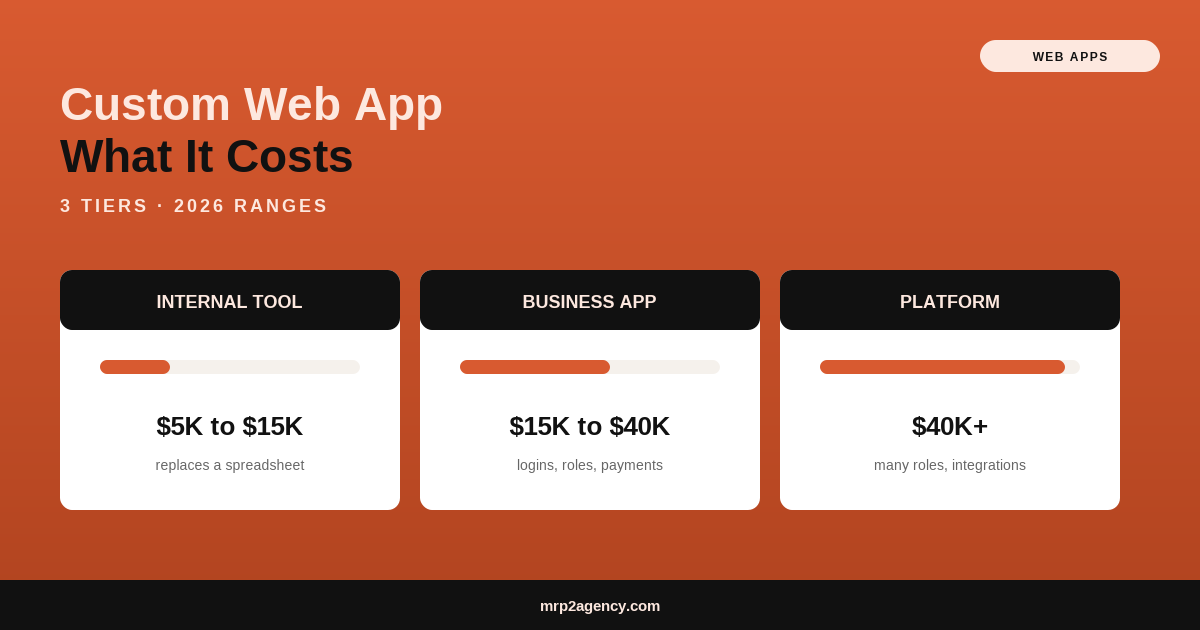
Here are the tiers I use when someone asks for a ballpark. These are general ranges for a solo developer or small shop, and your project can land outside them. My website cost guide lists a basic web app (auth, a database, custom workflows) at $10,000 to $30,000. That sits across the first two tiers here, and the tiers below break it out by how much the app has to do, so they run lower and higher at the ends.
| Tier | What it is | Typical range | Typical timeline |
|---|---|---|---|
| Simple internal tool | One user type, a few screens, basic reports, replaces a spreadsheet | $5,000 to $15,000 | 3 to 8 weeks |
| Standard business app | Logins, a few roles, payments or email, an admin area | $15,000 to $40,000 | 2 to 4 months |
| Multi-role platform | Several user types, complex rules, integrations, reporting | $40,000 to $100,000+ | 4 to 9 months |
A mid-sized agency will often quote higher for the same scope, because project managers and account managers get paid out of your budget. My view on that tradeoff is in the guide to hiring a freelance web developer in Kansas City.
These are not fixed prices. Treat them as the zone where honest quotes tend to fall, then let the factors below move you up or down.
What Actually Drives the Price
Price follows scope, and scope is mostly five things.
- Number of user roles. An admin, a staff member, and a customer each need their own screens and permissions. Every role multiplies the testing and the edge cases.
- Business rules. “Calculate the total” is easy. “Calculate the total with tiered pricing, member discounts, and tax by county” is a week of careful work.
- Integrations. Each outside system (payments, accounting, email, a CRM) adds work. Taking cards through Stripe is routine to build, but its standard rate is 2.9% plus 30 cents per domestic card transaction, and that’s a running cost on top of the build.
- Data migration. Getting years of messy spreadsheet rows into a clean database is slow, and it’s the line item people forget.
- Security and compliance needs. Anything handling health, student, or financial data costs more to build and test. The OWASP Top 10 is the standard reference list of web app security risks, and a competent developer designs against it from day one.
The cheapest way to cut a quote is to cut features, not quality. Ship the three screens that matter, then add the rest once real people are using it.
The Costs After Launch
The build quote is not the total. An app is software that has to keep running, and that has a monthly price.
- Hosting and database: often $20 to $200 per month for a small app, more with heavy traffic.
- Maintenance: dependency updates, security patches, and small fixes. Budget roughly 10 to 20% of the build cost per year as a rule of thumb.
- Third-party fees: payment processing, email or SMS sending, mapping or other paid services.
- New features: once people use it, they’ll ask for more. That’s a good sign, but it’s a budget line.
Ask any developer up front who owns the code, where it’s hosted, and what happens if you part ways. You should own the repository and the accounts.
Web App vs Spreadsheet for a Small Business
I’ll say the quiet part loud: a lot of businesses should stay in a spreadsheet longer than they think. Google Sheets allows up to 20 million cells per spreadsheet, which is more than most small operations will ever fill. It’s free or nearly free, everyone already knows it, and you can change it in five minutes.
A spreadsheet starts to fail when these things show up:
- Several people edit the same data and overwrite each other.
- You need permissions, where staff see some rows and customers see only their own.
- You copy data between sheets by hand every week.
- Customers need to log in, pay, or book without you in the loop.
- Errors cost real money, and nobody trusts the formulas anymore.
If you’re seeing two or more of those, an app starts to pay for itself. If you’re seeing none, keep the spreadsheet and put the money toward marketing.
Custom Software vs Off-the-Shelf for a Small Business
There’s a middle path that costs far less than a custom build: a no-code database tool or a niche SaaS product. Airtable, for example, lists paid plans at $20 and $45 per user per month billed annually, with a free tier for very small teams. At five users that’s a few hundred to a couple thousand dollars a year, versus thousands upfront for a build.
| Factor | Off-the-shelf / no-code | Custom web app |
|---|---|---|
| Upfront cost | Low | $5,000 and up |
| Ongoing cost | Per-user fees, forever | Hosting plus maintenance |
| Fit to your process | You adapt to the tool | The tool adapts to you |
| Limits | Plan caps, locked features | Few, you own the code |
| Time to start | Days | Weeks to months |
My rule of thumb: buy first, build when buying stops fitting. Per-user fees add up as you grow, and a tool that forces awkward workarounds costs you staff time every day. Custom starts to win when your process is your competitive edge, when you have many users, or when the tool simply can’t do what you need.
How to Get a Quote You Can Compare
Vague requests get vague, inflated quotes. Before you contact anyone, write down a short brief.
- Who uses it, and what each type of user needs to do.
- What it replaces: the spreadsheet, the paper form, the email chain.
- Must-have vs nice-to-have features, in two separate lists.
- Integrations you already know you need.
- Your timeline and a rough budget. Sharing a budget gets you a scoped proposal instead of a guess.
Then ask for a fixed-price quote on the must-haves, with the nice-to-haves priced as optional phases. If a quote can’t tell you what’s included in plain language, that’s your signal to move on. The write-up on a web app for a booster club shows how those build decisions play out in practice.
What This Means for Your Budget
Plan on $5,000 to $15,000 for a simple tool that replaces a painful spreadsheet, and $15,000 to $40,000 for a standard app with logins, roles, and payments. Add a monthly line for hosting and maintenance, and leave room for the changes you’ll want after launch. If your needs fit an off-the-shelf tool, take that deal and revisit custom later.
If you can’t tell which side of the line you’re on, that’s a short conversation, not a sales pitch. Tell me about your project and I’ll give you a straight answer, including “you don’t need an app yet” when that’s true.